· Computer vision
When OCR puts the right price on the wrong part
The hinge on this parts sheet has no price. A parser gave it 32.70, a number that appears on the sheet exactly once. Look one row down. That price belongs to the gasket.
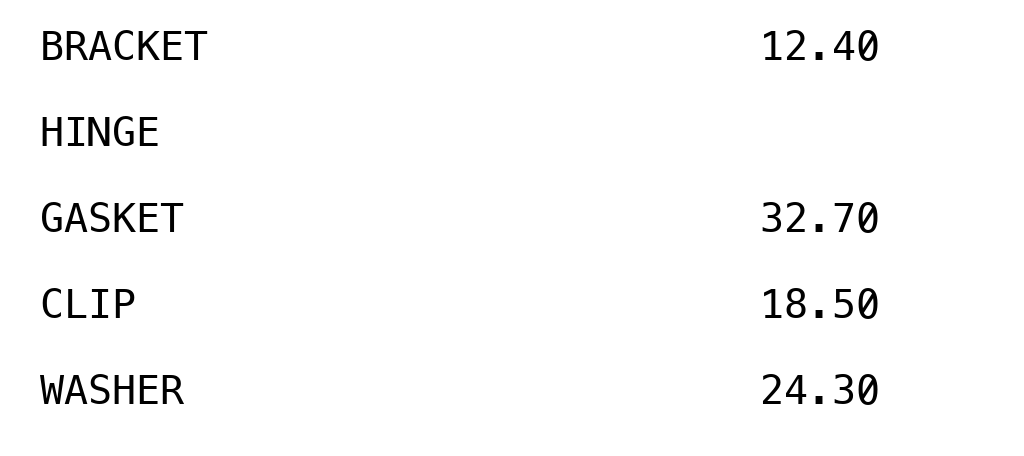
I generated a five-row parts sheet with Python and ran Apple Vision’s text recognition on two full-height crops, one for each column. It read every printed label and price correctly. The mistake appeared in the next line of code. Pairing the lists with zip(labels, prices) assigned the gasket’s price to the hinge, shifted the next two prices, and dropped the washer entirely.
| Item | Printed price | By list position | By row height |
|---|---|---|---|
| Bracket | 12.40 | 12.40 | 12.40 |
| Hinge | Blank | 32.70 | Blank |
| Gasket | 32.70 | 18.50 | 32.70 |
| Clip | 18.50 | 24.30 | 18.50 |
| Washer | 24.30 | Missing row | 24.30 |
Each Vision observation includes a bounding box. I kept its vertical midpoint, converted it to distance from the top using 1 - boundingBox.midY, and paired each price with the nearest item row. The crops both span the full height, so their vertical coordinates are comparable. The script rejects a match farther away than 40% of the median item-row spacing and rejects a second price assigned to the same row. The hinge keeps an empty cell. Apple’s bounding-box coordinates
Both parsers used the same OCR observations. List position recovered one of five rows. Matching by height recovered five of five on this synthetic, upright form. Test skewed scans, wrapped labels and missing item names separately before applying the rule to another layout.
Reproduce the result
Extract both source files into one directory on a Mac with Swift, the Menlo system font and Python’s Pillow package. From that directory, run:
python3 receipt_rows.pyThe script generates the sheet, recognises two temporary images locally and removes them on exit. Tested on macOS 15.0.1, Swift 6.0.3, Python 3.9.6 and Pillow 11.3.0.